

Developers interact with tests constantly, but they aren't always well-versed in the formal terminology used to describe them—or why that terminology matters.
In software QA, test is an overloaded term. By using precise terminology, we can clearly separate test specifications from test runs (performing or running tests).
In this light, a test case is a formal specification for a test. While writing test cases using a natural language isn't necessary for every scenario—automated tests, for instance, are captured directly as code—almost every software system requires occasional manual testing. Also, test code benefits from additional metadata and good organization, so knowing how to structure a test case is a universally valuable skill.
The Anatomy of a Test Case
The vast majority of functional tests follow a reliable, three-part structure. If you are new to formal testing, this is the perfect starting point:
• Preconditions (Test Requirements): The initial state of the program, required inputs, and the environment needed before the test can begin.
• Test steps: The sequential actions required to execute the test. These are typically direct interactions with the system under test, but they can occasionally include external, real-world steps if integration or collaboration is required.
• Postconditions (Expected Results): The state that the application should be in after the steps are completed. This includes the expected outputs, returned values, or observable behavioral measurements.
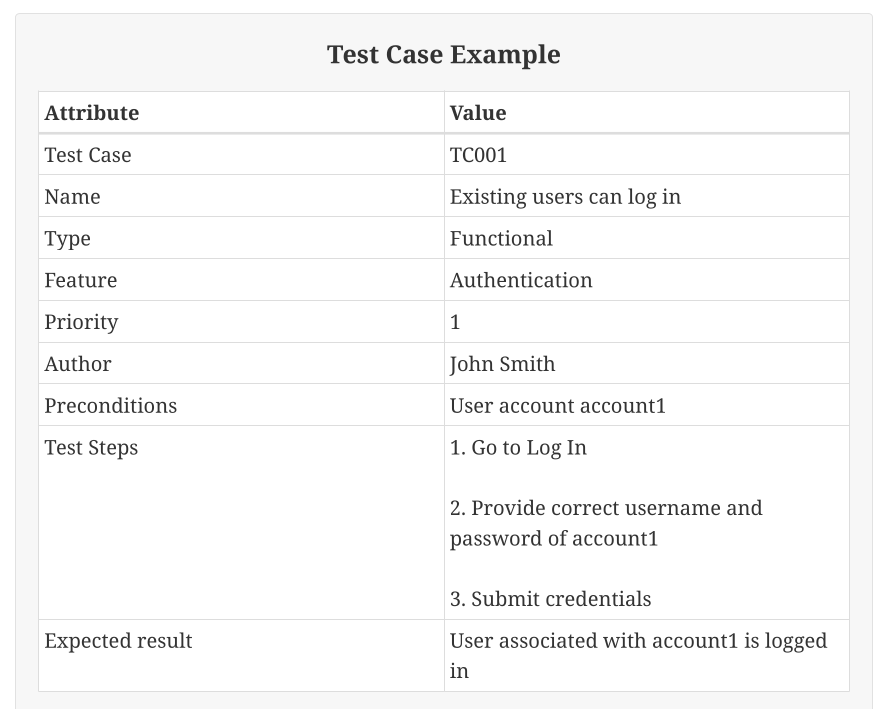
Additional attributes
In formal, manual test suites, test cases often include explicit attributes that are implicit for automated tests (for example, the author is automatically tracked in the version control system):
• Name or identifier: In large test suites with many manually performed tests, it is handy to have a short identifier, like a number, to quickly refer to a particular test.
• Classification (however we decide to classify it, e.g., security, performance, UI)
• Part of the software system being tested: A specific unit/component/application/subsystem.
• A group or groups it belongs to (e.g., a specific feature, user story, regression tests, …)
• Target software version(s) (in case the software is versioned)
• Target environment (specific browsers, operating systems, or runtime dependencies)
• Priority
• Automated (yes/no) (tracking progress if test cases are written to be automated later)
• Author
Even in automated tests we can add additional attributes for easier test case management, like organizing tests into various groups using tags or other means.
One critical difference between automated and manual testing is how we treat priority. Due to time constraints, it is common that a testing team rarely has the luxury of running every single manual test.
Instead of ranking tests in a vague relative order, it is more effective to bucket them into absolute categories like "Must Test" or "Should Test." Manual test priorities also provides a clear roadmap for the automation strategy—high-priority manual tests are prime candidates to be automated.
It is not always needed to be overly formal when specifying test cases. However, adopting a structured test case format and leveraging key attributes will help when you do need to track tests systematically. You can also explore Test Case Management Systems (TCMS) for larger test suites when generic tools stop being enough.
May your agent write good test cases for you.
—Petr